
- May 26, 2026
- CoinTracker, Crypto Tax Software
CoinTracker - Crypto Tax Software Review

Disclosure: This post may contain affiliate links. If you sign up or make a purchase through our links, we may earn a commission at no extra cost to you. We only recommend products and services we believe add value.

Best for Portfolio Tracking
CoinTracker
90
CoinTracker is a crypto tax and portfolio tracking platform that syncs wallets and exchanges, calculates gains, and generates tax-ready reports.
Type
Crypto Tax Software
DeFi & NFT Support
Limited
Pricing
$0-599
Signup Offer
None
Integrations
500+ Wallets, Exchanges / 20k+ DeFi Platforms
Pros and Cons
Strong portfolio tracking features
Wide exchange and wallet integrations
Clean, user‑friendly interface
Mobile app availability
Cons
Higher pricing for large transaction counts
DeFi and NFT support still maturing
Occasional syncing inconsistencies
Tax features less advanced than some competitors

Overview
CoinTracker is a well‑established crypto portfolio and tax platform known for its seamless integrations, real‑time tracking, and strong emphasis on accuracy across multi‑exchange portfolios. Founded in 2017, it has become a popular choice for users who want a single hub to monitor their holdings while also generating compliant tax reports. Its polished interface and automatic syncing make it appealing to both beginners and experienced investors who value convenience.
The platform connects with a wide range of exchanges, wallets, and blockchains, enabling users to consolidate trading, staking, and DeFi activity into a unified dashboard. CoinTracker provides ongoing portfolio insights; such as cost basis, performance, and asset allocation; alongside tax features that support common events like trades, airdrops, and rewards. It also offers jurisdiction‑specific tax forms and integrates with major filing services, making the reporting process straightforward.
A defining strength of CoinTracker is its dual focus on portfolio management and tax compliance. While it may not offer the same depth of advanced reconciliation tools as some specialized tax platforms, its always‑on tracking, clean design, and broad integrations make it highly practical for users who want continuous visibility into their crypto finances. Power users with complex DeFi activity may still need occasional manual adjustments, but the platform handles most mainstream activity smoothly.
Overall, CoinTracker stands out as a convenience‑driven, integration‑heavy solution that blends portfolio tracking with tax reporting in a single interface. It is particularly well suited for long‑term investors, casual traders, and users who want ongoing insights into their holdings, even if those with highly intricate on‑chain activity may prefer more granular editing capabilities.
Pros and Cons
Strong portfolio tracking features
CoinTracker doubles as a tax tool and a real‑time portfolio tracker, offering performance charts, cost‑basis insights, and multi‑wallet visibility.
Wide exchange and wallet integrations
It supports hundreds of exchanges and wallets, making it easy to sync activity across centralized, decentralized, and on‑chain sources.
Clean, user‑friendly interface
The platform is polished and intuitive, helping users quickly review transactions, identify errors, and monitor gains.
Mobile app availability
Unlike some competitors, CoinTracker offers iOS and Android apps for on‑the‑go portfolio and tax tracking.
Cons
Higher pricing for large transaction counts
Costs can rise quickly for users with high‑volume trading, bots, or heavy DeFi activity.
DeFi and NFT support still maturing
While improving, complex DeFi protocols, bridging, and NFT trades may require manual adjustments.
Occasional syncing inconsistencies
Some exchanges or blockchains may not import perfectly, leading to missing cost basis or duplicate entries.
Tax features less advanced than some competitors
Its tax‑specific tools are solid but not as deep as platforms that focus exclusively on tax workflows.
Scoring System
Each crypto tax software platform is evaluated on a 100-point scale using a weighted framework designed to reflect real-world usability, accuracy, and compliance with evolving crypto tax regulations. Scores are based on the following categories:
- Tax Calculation Accuracy (25 points) – Measures the reliability of transaction classification, cost-basis calculations, handling of complex DeFi/NFT activity, and support for multiple accounting methods such as FIFO, LIFO, and HIFO.
- Integrations & Data Import (20 points) – Evaluates the number of supported exchanges, wallets, blockchains, and APIs, as well as the ease of syncing transaction histories automatically.
- Compliance & Regional Tax Support (15 points) – Considers support for different tax jurisdictions, generation of country-specific tax forms, audit-ready reports, and alignment with evolving regulatory standards.
- Features & Reporting Tools (15 points) – Assesses available reporting tools such as capital gains summaries, income tracking, portfolio insights, DeFi/NFT reporting, and export compatibility with accounting software.
- User Experience & Interface (10 points) – Reviews onboarding, dashboard clarity, workflow simplicity, and the ability for both beginners and advanced users to navigate the platform efficiently.
- Customer Support & Documentation (10 points) – Evaluates the availability and quality of support channels, response times, knowledge bases, tutorials, and tax guidance resources.
- Pricing & Value for Money (5 points) – Examines subscription tiers, transaction limits, upgrade costs, and whether the features provided justify the price.
Each category contributes a defined portion of the total score. Higher-scoring platforms demonstrate a strong balance of accuracy, integrations, usability, and compliance; not just the ability to import transactions or generate basic tax reports.
Tax Calculation Accuracy
24
Calculation Methodology
CoinTracker’s tax engine is built around high‑precision capital gains and income calculations that work reliably across centralized exchanges, wallets, and supported blockchains. It supports multiple accounting methods; including FIFO, LIFO, HIFO, and Specific ID; allowing users to align their reports with the requirements of their jurisdiction or their preferred tax‑optimization strategy.
Each transaction includes a clear audit trail, showing cost basis, proceeds, holding period, and gain/loss. This transparency makes it easy for users and accountants to verify how CoinTracker arrived at each calculation.
CoinTracker also prioritizes accurate transfer matching. When assets move between a user’s own wallets or exchanges, the platform attempts to automatically pair deposits and withdrawals to avoid misclassifying them as taxable disposals. This reduces the risk of phantom gains — a common issue in crypto tax reporting when transfers are misinterpreted.
Handling of Complex Transactions
CoinTracker performs reliably with standard trading activity and simple on‑chain interactions. Its reconciliation engine flags missing cost basis, duplicate entries, and untagged transfers, helping users correct issues before generating reports.
However, CoinTracker’s accuracy becomes more variable with complex DeFi activity, especially when transactions involve:
- multi‑step swaps
- liquidity pool deposits/withdrawals
- yield aggregator vaults
- wrapping/bridging
- auto‑compounding strategies
CoinTracker supports many major protocols, but it does not deeply decode smart‑contract interactions. As a result, some DeFi transactions may require manual tagging to ensure correct tax treatment. Users with heavy DeFi activity often need to review entries carefully to maintain accuracy.
Income Classification
CoinTracker automatically identifies and categorizes staking rewards, airdrops, mining income, interest, and other reward‑based events. These are separated from capital gains and included in income summaries according to the user’s jurisdiction.
For centralized platforms and straightforward on‑chain rewards, classification is typically accurate. More complex income flows; such as rewards distributed through multi‑contract DeFi mechanisms or rebasing tokens; may require manual adjustments to ensure they are treated as income rather than capital gains.
International Tax Accuracy
CoinTracker supports tax rules for multiple countries, including the US, UK, Canada, and Australia, adapting calculations to local requirements such as:
- short‑term vs long‑term gains
- share pooling (UK)
- superficial loss rules (Canada)
- staking income treatment differences
This makes CoinTracker suitable for users in regions with well‑defined tax frameworks. In jurisdictions with more nuanced rules around DeFi or staking, users may need to apply manual adjustments to fully align their reports with local regulations.
Integrations & Data Import
18
Exchange, Wallet, and Blockchain Coverage
CoinTracker offers one of the broadest integration ecosystems in the crypto‑tax space, with support for hundreds of centralized exchanges, major wallets, and multiple blockchains. API integrations cover all the major platforms; Coinbase, Binance, Kraken, Gemini, Bitstamp, and many more; making it easy for users with multi‑exchange activity to sync their data automatically.
Wallet support is similarly strong. Users can import by public address on Bitcoin, Ethereum, and most EVM‑compatible chains, allowing CoinTracker to pull token balances and transaction histories directly from the blockchain. This makes it convenient for users who hold assets across multiple wallets or chains.
Where CoinTracker’s coverage is less complete is in deep smart‑contract interpretation. While it can read token transfers and basic on‑chain events, it does not fully decode complex DeFi interactions, which can affect accuracy for advanced users.
API Syncing and Automation
CoinTracker’s API syncing is generally stable and reliable for major exchanges. The platform automatically imports:
- Trades
- Deposits and withdrawals
- Staking rewards
- Fees
- Token balances
For users with moderate trading activity, this automation significantly reduces manual work. CoinTracker also refreshes balances regularly, making it useful as a lightweight portfolio tracker.
However, API coverage for derivatives, margin, and futures varies by exchange. Some platforms require CSV imports to capture the full transaction history, especially for advanced trading products.
CSV Import and Manual Adjustments
CoinTracker supports CSV imports for virtually any exchange or wallet, including those without API support. This is especially helpful for:
- older or defunct exchanges
- platforms with incomplete API data
- NFT marketplaces
- OTC trades
- custom trading logs
The CSV importer is flexible, but users may need to adjust column mappings or clean up inconsistent data. CoinTracker provides tools for editing, merging, and reclassifying transactions, though the process can be time‑consuming for users with large or complex datasets.
DeFi, NFT, and Multi‑Chain Support
CoinTracker supports DeFi and NFT activity at a basic to moderate level, depending on the protocol. It can detect token transfers, swaps, and simple staking events, but it does not deeply interpret:
- multi‑step swaps
- liquidity pool movements
- yield aggregator vaults
- bridging and wrapping
- auto‑compounding strategies
- NFT mint mechanics or bundled sales
As a result, users with heavy DeFi or NFT activity often need to perform manual tagging to ensure correct tax treatment. CoinTracker’s integrations are strong for mainstream activity but less robust for advanced on‑chain ecosystems.
Compliance & Regional Tax Support
14
U.S.‑Focused Compliance Framework
CoinTracker is built with a strong emphasis on U.S. tax compliance, making it a reliable option for users who need IRS‑aligned reporting. It generates all the core documents needed for U.S. filing, including Form 8949, Schedule D, and detailed income summaries. These exports integrate cleanly with major filing software and are structured in a way that accountants can use without additional formatting.
CoinTracker’s calculations follow IRS guidance on cost basis, disposals, and income recognition. For users with straightforward trading activity, this alignment makes CoinTracker one of the more dependable self‑service tools for U.S. compliance.
Handling of DeFi and Smart‑Contract Activity Under Local Rules
CoinTracker supports DeFi and NFT activity, but its compliance accuracy depends heavily on the clarity of the underlying data. The platform can detect token transfers, swaps, and basic staking events, but it does not deeply interpret complex smart‑contract interactions. As a result, users with advanced DeFi activity may need to manually tag or adjust transactions to ensure they reflect the correct tax treatment.
Examples of activity that may require manual review include:
- multi‑step swaps
- liquidity pool deposits/withdrawals
- bridging and wrapping
- yield aggregator vaults
- NFT minting or bundled sales
CoinTracker provides the tools to correct these entries, but users must apply the appropriate tax logic themselves.
Support for International Jurisdictions
CoinTracker supports tax frameworks for several major regions, including the US, UK, Canada, and Australia, adapting calculations to local rules such as:
- share pooling (UK)
- superficial loss rules (Canada)
- short‑term vs long‑term gains
- local treatment of staking and airdrops
This makes CoinTracker suitable for users in countries with well‑defined crypto tax guidance. In jurisdictions with more nuanced or evolving rules; especially around DeFi; users may need to apply manual adjustments or consult a local tax professional to ensure full compliance.
Audit‑Ready Documentation
CoinTracker provides detailed transaction logs, cost‑basis calculations, and income summaries that can be used to support an audit. While it does not include CPA‑level review or professional filing services, the documentation is structured clearly enough for accountants to verify and defend the calculations if needed.
Users with complex portfolios may need to ensure that all DeFi and NFT transactions are correctly tagged before relying on CoinTracker’s reports for audit purposes.
Features & Reporting Tools
13
Core Reporting Capabilities
CoinTracker is built around a clean, automated reporting engine that focuses on delivering accurate capital gains, income summaries, and year‑end tax documents with minimal user intervention. It generates all the standard reports needed for filing; including capital gains summaries, income breakdowns, and IRS‑ready exports; and presents them in a format that accountants can easily interpret.
Each transaction includes a clear breakdown of cost basis, proceeds, and gain/loss, making it straightforward to verify how CoinTracker arrived at each calculation. For users with simple to moderately complex portfolios, this level of transparency is more than sufficient.
Portfolio Tracking and Real‑Time Insights
One of CoinTracker’s strongest features is its portfolio tracking functionality, which is more polished than most crypto‑tax platforms. Users can view:
- real‑time portfolio value
- asset allocation
- unrealized gains and losses
- performance over time
- cost basis per asset
This makes CoinTracker useful not only at tax time but throughout the year as a lightweight portfolio tracker. The interface is clean, mobile‑friendly, and easy to navigate, which is a major advantage for users who want ongoing visibility into their holdings.
DeFi and NFT Interpretation
CoinTracker supports DeFi and NFT activity at a basic to moderate level, depending on the protocol. It can detect token transfers, swaps, and simple staking events, but it does not deeply decode complex smart‑contract interactions. As a result, some advanced DeFi activity may appear as:
- unclassified transfers
- missing cost basis
- ambiguous swaps
- incorrectly labeled income
Users can manually tag or adjust these entries, but CoinTracker does not offer CPA‑level cleanup or expert review. This makes it less suitable for users with heavy DeFi, multi‑chain, or NFT activity who need deeper interpretation.
Reconciliation and Error Detection
CoinTracker includes reconciliation tools that flag:
- missing cost basis
- unmatched transfers
- duplicate entries
- incomplete exchange data
These alerts help users identify issues before generating final reports. The reconciliation system is effective for simple and moderate portfolios, but it can become time‑consuming for users with large datasets or complex DeFi activity, since CoinTracker relies heavily on manual user intervention rather than automated smart‑contract decoding.
Export Options and Accountant‑Friendly Outputs
CoinTracker offers a wide range of export formats, including:
- Form 8949
- Schedule D
- TurboTax‑compatible files
- CSV exports for gains, income, and full transaction logs
These exports are structured cleanly and are easy for accountants to work with. For users who file through tax software, CoinTracker’s integrations streamline the process significantly.
User Experience & Interface
9


Overall design philosophy
CoinTracker’s interface is built around a clean, modern, and highly approachable design, making it one of the most user‑friendly crypto tax platforms for everyday investors. The platform emphasizes simplicity, visual clarity, and ease of navigation, which is why many users adopt it as both a tax tool and a lightweight portfolio tracker.
The design leans toward consumer‑friendly usability rather than accountant‑style precision. This makes CoinTracker feel intuitive for beginners and casual traders, though advanced users may occasionally wish for deeper visibility into how certain on‑chain transactions are interpreted.
Layout and navigation
CoinTracker’s navigation is straightforward and polished. The workflow is organized into clear sections:
- Portfolio
- Transactions
- Taxes
- Wallets & Exchanges
Each section uses clean tables, filters, and visual summaries to help users understand their data at a glance. The transaction list is easy to scan, with clear labels for swaps, transfers, income, and fees. For users with moderate activity, this layout makes reconciliation painless.
Where CoinTracker becomes less efficient is with very large or complex datasets, especially those involving heavy DeFi activity. The interface remains clean, but the manual tagging required for complex transactions can make the workflow feel slower.
Visual clarity and data presentation
CoinTracker excels at visual clarity. Its portfolio dashboard is one of the most polished in the crypto‑tax space, offering:
- real‑time portfolio value
- performance charts
- asset allocation visuals
- unrealized gains/losses
- cost‑basis summaries
These visuals make CoinTracker feel more like a portfolio tracker than a tax tool, which is a major advantage for users who want year‑round insights rather than just annual tax reports.
However, the simplicity of the visuals means that complex DeFi flows are not deeply explained. Users may see a swap or transfer without a detailed breakdown of the underlying smart‑contract steps.
Workflow efficiency
For users with simple or moderately complex portfolios, CoinTracker’s workflow is extremely efficient. API syncing is smooth, reconciliation alerts are clear, and tax reports can be generated with minimal friction.
For users with advanced DeFi or multi‑chain activity, the workflow becomes more manual. CoinTracker captures the raw data but often requires users to:
- tag transactions
- fix missing cost basis
- classify income events
- resolve ambiguous swaps
The interface supports this work well, but it does not automate it to the degree that power users might prefer.
Mobile experience
CoinTracker offers one of the best mobile experiences in the crypto‑tax category. Its mobile app and responsive web interface allow users to:
- track portfolio performance
- view transactions
- check balances
- monitor gains/losses
While tax preparation is still best done on desktop, the mobile experience is excellent for day‑to‑day portfolio tracking.
Customer Support & Documentation
8
Support channels and responsiveness
CoinTracker provides a primarily self‑service support model with email‑based assistance and an in‑app help system. Response times are generally reasonable for standard inquiries, but support can feel slower during peak tax season, especially for users on lower‑tier plans. Unlike platforms that offer CPA‑level review, CoinTracker’s support focuses on helping users understand the software rather than interpreting complex tax scenarios.
For users with simple or moderately complex portfolios, support is usually sufficient. For users dealing with advanced DeFi activity or multi‑chain transactions, support may not always provide the depth needed to resolve nuanced tax questions.
Knowledge base and documentation
CoinTracker maintains a well‑structured knowledge base that covers:
- API setup guides
- CSV import instructions
- DeFi tagging basics
- tax form explanations
- common reconciliation issues
The documentation is clear, beginner‑friendly, and visually clean. It excels at explaining standard workflows and centralized‑exchange imports. However, guidance for complex DeFi, NFT mechanics, or multi‑step smart‑contract interactions is more limited, often requiring users to infer the correct tax treatment or consult external resources.
In‑app guidance and reconciliation tools
CoinTracker includes helpful in‑app prompts and reconciliation alerts that flag:
- missing cost basis
- unmatched transfers
- duplicate transactions
- ambiguous swaps
These tools are intuitive and make it easy for users to identify issues early. For simple and moderate portfolios, they streamline the workflow significantly. For complex DeFi portfolios, the alerts are useful but often require manual tagging, since CoinTracker does not decode smart‑contract logic deeply.
Professional services and tax‑expert access
Unlike hybrid platforms that include CPA involvement, CoinTracker does not offer:
- full tax filing
- CPA review
- audit assistance
- hands‑on data cleanup
This means users must rely on their own understanding; or their personal accountant; to interpret complex transactions. CoinTracker’s role is to provide the data and tools, not professional tax advice.
Pricing & Value for Money
4
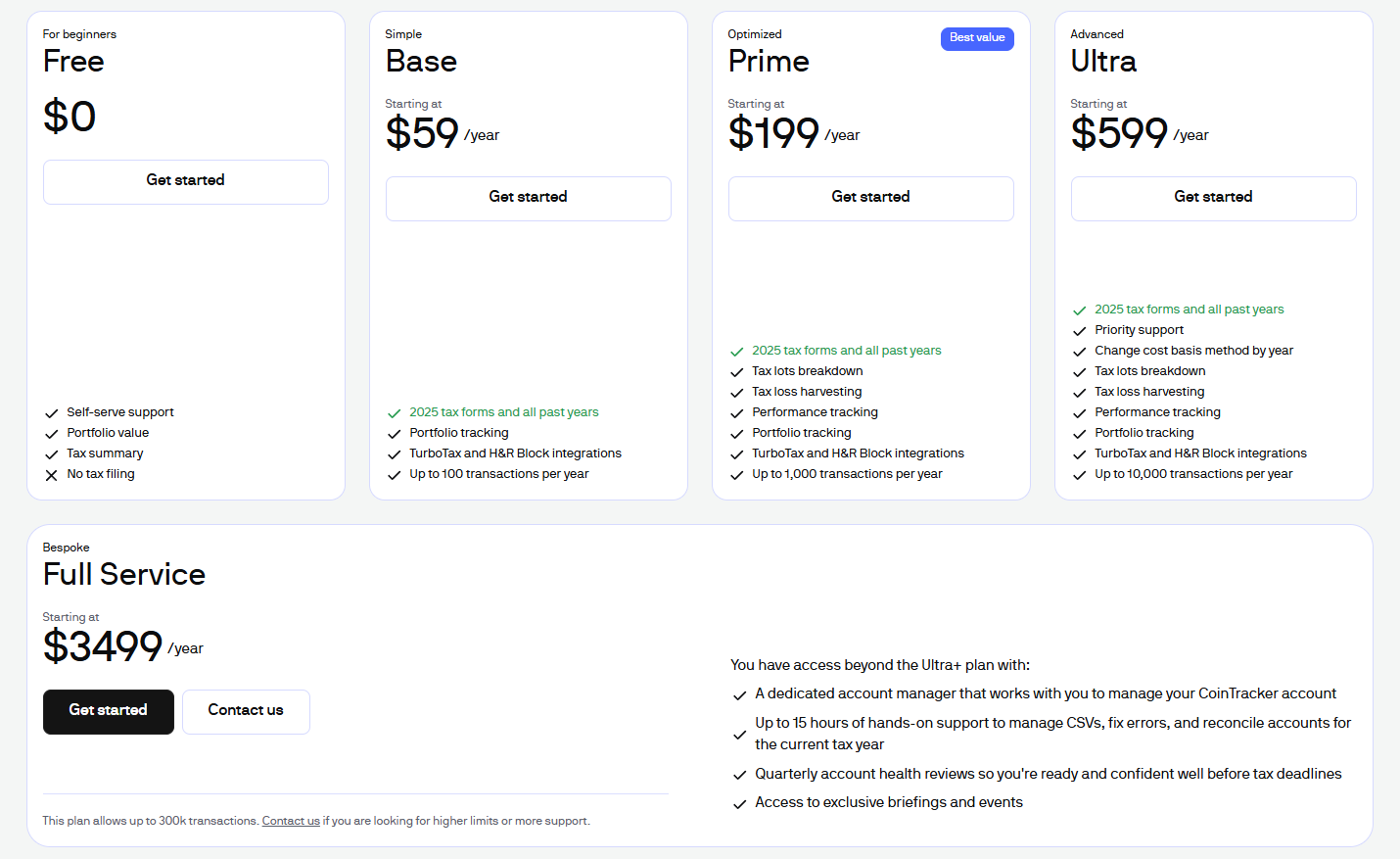
Pricing Table extract – Find all exact numbers regarding the platform’s prices here.
Pricing structure
CoinTracker uses a tiered pricing model based primarily on transaction count, making it straightforward for users to estimate their cost. Lower‑tier plans focus on simple tax reporting, while higher tiers unlock support for larger portfolios and more complex activity. Unlike hybrid platforms that include CPA involvement, CoinTracker’s pricing reflects a pure software‑as‑a‑service model, which keeps costs lower but places more responsibility on the user to ensure accuracy.
For users with moderate activity, CoinTracker is generally more affordable than platforms that bundle professional services. For users with very large or complex portfolios, pricing can increase quickly due to transaction‑based tiers.
Value for simple and moderate users
CoinTracker offers excellent value for users with:
- simple CEX‑based trading
- long‑term holding strategies
- basic staking rewards
- occasional DeFi activity
These users benefit from:
- clean automation
- broad exchange integrations
- a polished portfolio tracker
- easy‑to‑generate tax reports
For this group, CoinTracker is one of the most cost‑efficient options because it minimizes manual work without requiring expensive professional services.
Value for DeFi, NFT, and high‑complexity users
CoinTracker is usable for complex portfolios, but its value depends on the user’s willingness to perform manual tagging and reconciliation. Users with:
- heavy DeFi activity
- multi‑chain portfolios
- NFT trading or royalties
- bridging/wrapping flows
may find that CoinTracker’s pricing is attractive, but the time cost of manual cleanup can be significant. Since CoinTracker does not include CPA review or expert cleanup, users must rely on their own understanding or hire an external accountant.
For advanced users who want automation and professional oversight, CoinTracker may feel less cost‑effective than hybrid platforms.
Cost efficiency compared to alternatives
CoinTracker is positioned as a mid‑priced, automation‑focused solution. Its strengths include:
- broad integrations
- polished UX
- strong portfolio tracking
- clean tax exports
Its limitations appear when compared to platforms that include CPA services. CoinTracker is cheaper, but users must handle complex reconciliation themselves.
For simple and moderate portfolios, CoinTracker is one of the most cost‑efficient tools. For complex portfolios, the value depends on how much manual work the user is willing to do.
The Block Note's Score
Aggregated Score
24
18
14
13
9
8
4
Total Score
Who is CoinTracker Best for
Best for Portfolio Tracking
Ideal users and portfolio types
CoinTracker is best suited for users with simple to moderately complex crypto portfolios who want a clean, automated, and visually polished experience. It excels for people whose activity is concentrated in:
- centralized exchanges
- long‑term holding strategies
- basic staking rewards
- light DeFi usage
These users benefit the most from CoinTracker’s automation, broad integrations, and strong portfolio tracking. The platform handles standard trading and simple on‑chain activity with minimal manual intervention.
Best fit by experience level
CoinTracker works well for a wide range of users, but it shines for:
- beginners who want an intuitive, low‑friction interface
- casual traders who use a few major exchanges
- long‑term investors who want ongoing portfolio visibility
- intermediate users who understand basic tagging and reconciliation
Advanced users can still use CoinTracker, but they must be comfortable performing manual cleanup for complex DeFi or NFT activity.
Regional suitability
CoinTracker is well‑suited for users in countries with clear crypto tax frameworks, especially:
- United States (Form 8949, Schedule D, TurboTax integration)
- United Kingdom (share pooling support)
- Canada (superficial loss rules)
- Australia (CGT alignment)
For users in these regions, CoinTracker provides accurate calculations and clean exports that accountants can easily work with.
In countries with more nuanced rules around DeFi, staking, or NFTs, users may need to apply manual adjustments or consult a local tax professional.
Who might not need CoinTracker
CoinTracker is less ideal for users who:
- have very complex DeFi portfolios
- rely heavily on bridging, wrapping, or multi‑step smart‑contract flows
- trade NFTs at scale
- need CPA‑level review or audit support
- want a fully automated DeFi interpreter
These users may find CoinTracker’s manual tagging requirements too time‑consuming.
Final Verdict
Best for Portfolio Tracking
CoinTracker
90
CoinTracker is a crypto tax and portfolio tracking platform that syncs wallets and exchanges, calculates gains, and generates tax-ready reports.
Type
Crypto Tax Software
DeFi & NFT Support
Limited
Pricing
$0-599
Signup Offer
None
Integrations
500+ Wallets, Exchanges / 20k+ DeFi Platforms
Pros and Cons
Strong portfolio tracking features
Wide exchange and wallet integrations
Clean, user‑friendly interface
Mobile app availability
Cons
Higher pricing for large transaction counts
DeFi and NFT support still maturing
Occasional syncing inconsistencies
Tax features less advanced than some competitors
Frequently Asked Questions
What is a crypto tax software?
A crypto tax software is a tool that automatically gathers your cryptocurrency transactions from exchanges, wallets, and blockchains. It organizes this data to calculate your gains, losses, and taxable income so you can prepare accurate tax reports without relying on manual spreadsheets.
How does a crypto tax software make tax reporting easier?
The software automates the most complex parts of crypto taxation. It tracks cost basis, identifies taxable events, matches transfers between wallets, and classifies income such as staking or airdrops. This reduces manual work and helps ensure your tax calculations are correct.
What types of crypto activity can a tax software handle?
Most platforms support a wide range of activity, including:
centralized exchange trades
wallet‑to‑wallet transfers
DeFi swaps and liquidity pools
staking and yield rewards
mining income
NFT mints, purchases, and sales
futures and margin trading
Some tools also decode advanced smart‑contract interactions.
Do I need a crypto tax software if I only made a few trades?
Yes. Even small amounts of crypto activity can create taxable events. Software helps you avoid mistakes, ensures accurate cost‑basis tracking, and saves time; especially if you used more than one exchange or wallet.
Are crypto tax softwares beginner‑friendly?
Most platforms are designed for all experience levels. Beginners can rely on automated imports, simple dashboards, and guided workflows, while advanced users can manage complex DeFi, NFT, and multi‑chain activity with more detailed tools.
Why isn’t pricing the main scoring factor?
Pricing matters, but it doesn’t determine how well a crypto tax tool performs. Accuracy, automation, DeFi support, integrations, and reliability have a much bigger impact on the user experience. A cheaper tool that miscalculates taxes or requires hours of manual cleanup ultimately costs more in time, stress, and potential filing errors.
Can a crypto tax software’s score change over time?
Yes. Crypto tax platforms evolve quickly; new integrations are added, DeFi support improves, bugs get fixed, and pricing models change. Scores are updated to reflect current performance, not past reputation, so you always get an up‑to‑date evaluation.
Do you receive compensation for higher scores?
No. Scores are independent of partnerships or affiliate relationships.
More Reviews

Koinly – Crypto Software Review
Koinly simplifies crypto tax reporting with automated tracking, smart reconciliation, and clear summaries for investors managing multi‑chain activity.
Read More
CoinLedger – Crypto Tax Software
CoinLedger makes crypto taxes easier by consolidating trades, detecting gains, and generating compliant reports in minutes.
Read More
Summ – Crypto Tax Software Review
Summ offers fast, automated crypto tax calculations with smart reconciliation and clear reports built for active multi‑chain users.
Read More
ZenLedger – Crypto Tax Software Review
ZenLedger simplifies crypto tax filing with fast imports, smart gain tracking, and clear IRS‑ready reports for active traders.
Read More